
Unifying a Fragmented Gym Experience

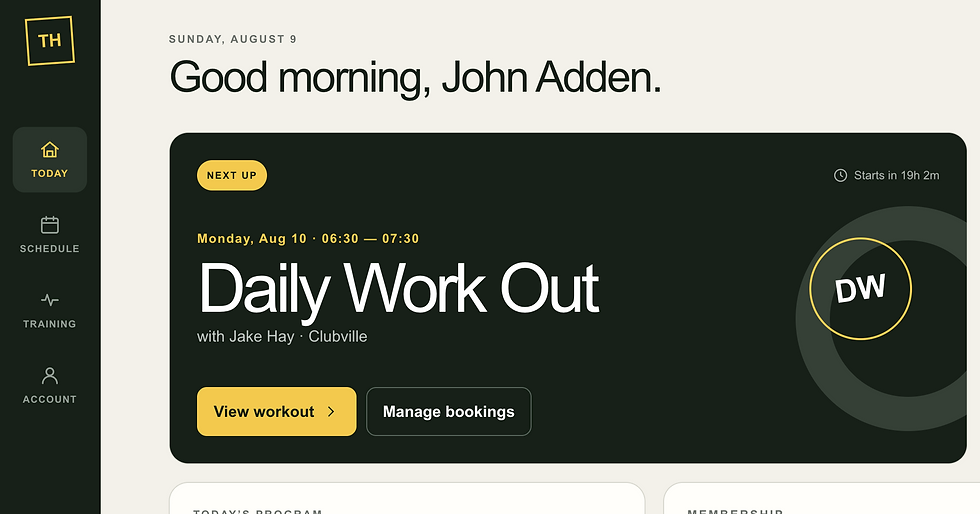
Designing a single digital hub for class bookings, workouts, and membership information
Project overview
This local Crossfit gym relied on several separate applications to support different parts of the member experience. Members used Mindbody to view and book classes, Beyond the Whiteboard (BTWB) to see programming and record workout results, and SumUp for membership and payment-related information.
Each application handled its own function, but the overall experience was fragmented. A member might need to open three different apps—with different navigation patterns, accounts, and data structures—to answer a few simple questions:
What class am I attending today?
What is today’s workout?
Where should I record my result?
Is my membership active, and when does it renew?
The project explored whether these separate services could be brought together behind one clear, mobile-first interface. The objective was not to replace the specialist platforms. It was to create a unified member experience above them.
My role
I led the product thinking, solution architecture, interface design, and prototype development. This included:
Defining the user problem and the scope of the first release
Mapping responsibilities across Mindbody, BTWB, and SumUp
Designing the shared data model and integration boundaries
Building a functional mobile-first prototype
Researching authentication, API access, pricing, data retention, and platform terms
Establishing a phased path from mock data to production integrations
The problem
The gym’s software stack was organized around business capabilities rather than the member journey. This is common when organizations adopt the best available tool for each operational need. Mindbody is optimized for scheduling, BTWB for performance tracking, and SumUp for commerce. None of them is designed to act as the member’s complete daily dashboard.
That created several experience problems:
Context switching: Members had to move between applications to complete closely related tasks.
Repeated authentication: Each platform maintained its own account and login state.
Inconsistent navigation: The applications used different terminology, layouts, and interaction patterns.
Poor visibility: Important information such as the next class, daily workout, and membership status was not visible in one place.
No unified member journey: Each platform exposed its own records, but the member experienced training as one continuous activity.
The core product question became:
How might we give members one simple place to understand and manage their training day without rebuilding the gym’s operational systems?
Product strategy
The proposed solution was a lightweight aggregation layer: a Training Hub that would connect to the existing platforms, normalize their information, and present only what a member needed at that moment.
This distinction shaped the entire design. The hub would not become a new booking engine, workout-programming platform, or payment processor. Mindbody, BTWB, and SumUp would remain the systems of record. The new application would provide a consistent experience across them.
The strategy offered several advantages:
The gym could preserve its existing operational workflows.
Coaches and administrators would not need to maintain the same data in another system.
Integration work could be introduced incrementally.
Actions without suitable API support could safely deep-link to the original platform.
The interface could be designed around members rather than vendor data structures.
Designing the experience
The application was designed mobile-first because members would most often use it while traveling to the gym, preparing for a class, or recording a result after training.
The navigation was reduced to four primary areas.
Today
The Today screen acts as the application’s home page. It answers the most immediate questions without requiring navigation:
The member’s next booked class
Coach and class time
The workout of the day
A quick action to record a result
Current membership status
Weekly attendance progress
The design deliberately prioritizes the next useful action rather than presenting a dense dashboard of every available data point.
Schedule
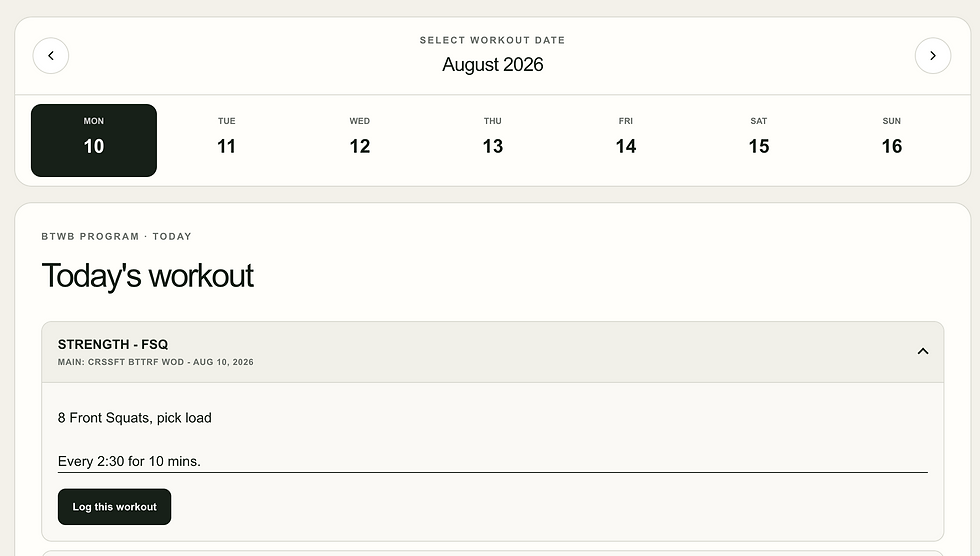
The Schedule screen presents the weekly class timetable with clear booked, available, and full states. Members can quickly understand availability and initiate booking or cancellation from a consistent interface.
In the prototype, these actions update mock data locally. In a production implementation, the same controls would call a server-side Mindbody integration or open the relevant Mindbody flow when direct API access is unavailable.
Training
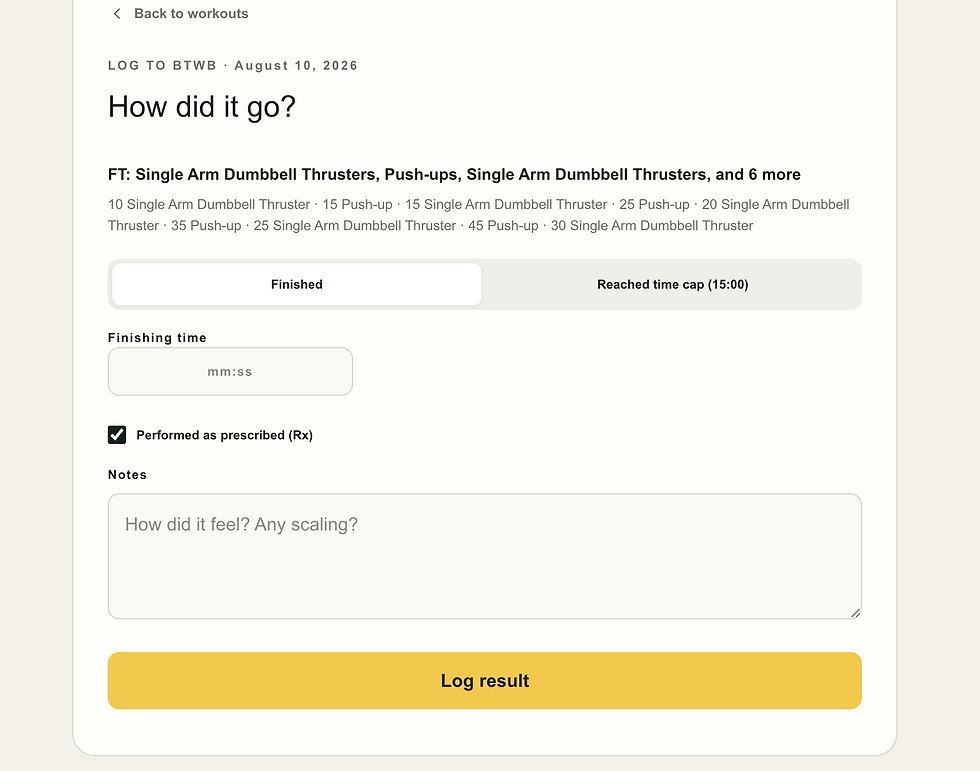
The Training screen displays the workout, movement details, scoring method, and result-entry controls. It also creates a place for recent results and personal records.
BTWB may remain the authoritative source for programming and performance history. The interface was therefore designed to support both integrated content and an “open in BTWB” fallback. This prevents the experience from breaking when licensing or API limitations restrict which programming data can be reproduced.
Account
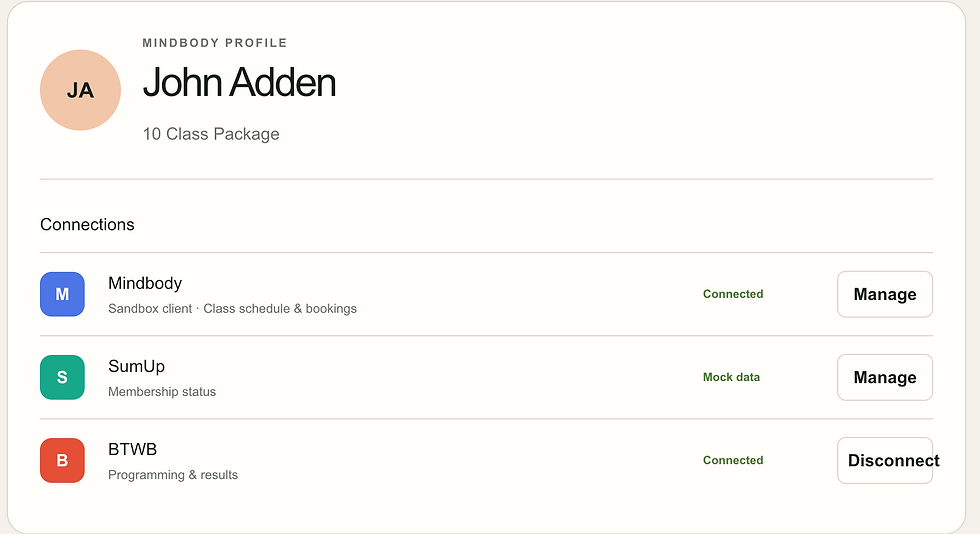
The Account screen provides membership information and makes the status of each platform connection visible. Rather than hiding integration failures, the design anticipates states such as:
Connected
Syncing
Connection required
Temporarily unavailable
Open in original app
This is especially important in an aggregated product: one unavailable provider should not make the entire application appear broken.
Technical approach
The functional prototype was built with:
Next.js
React
TypeScript
Responsive CSS
Local JSON-style mock data
Browser localStorage for prototype persistence
Next.js provided a practical path from prototype to full application. The same project can serve the responsive web interface, backend API routes, authentication callbacks, and server-side platform integrations.
TypeScript was used to define consistent application models for concepts such as classes, bookings, workouts, results, and memberships. This was important because the external platforms use different names and data structures for related concepts.
For example, the interface should not depend directly on a Mindbody class response. Instead, the Mindbody integration maps that response into an internal ClassSession model. The interface consumes the internal model, allowing a mock provider or another scheduling system to be substituted without redesigning the screen.
The intended architecture separates the interface from each provider:
The browser requests data from the application backend.
The backend authenticates the member and determines which data they may access.
Provider adapters communicate with Mindbody, BTWB, and SumUp.
External responses are translated into a small canonical model.
The frontend receives only the normalized information needed for the screen.
This also keeps API keys, access tokens, and integration credentials out of the browser.
Why mock data came first
The first functional version deliberately used mock data rather than immediately connecting the APIs.
This made it possible to validate several assumptions early:
Whether the four-screen structure was understandable
Which information belonged on the Today screen
Whether booking states were visually clear
What data the interface actually required from each provider
Which failures and disconnected states needed to be designed
Whether the experience worked comfortably on a phone
It also prevented API access, sandbox limitations, and commercial terms from dictating the interface before the member experience had been defined.
The mock is interactive rather than a static design. Users can book and cancel classes, move between screens, and record workout results. These choices persist in the browser through localStorage, making the prototype useful for testing behavior as well as appearance.
Authentication and account linking
A unified interface does not mean storing every platform password in one database.
The proposed authentication model has two layers:
Application authentication: A member signs into the Training Hub once, ideally using a magic link or passkey.
Provider authorization: The application establishes separately authorized connections to the gym’s external platforms.
Mindbody, SumUp, and BTWB have different authorization models. Some connections may be authorized by the individual member, while others require the gym’s business or administrator account. Provider tokens would be encrypted and retained only on the server. The application would never ask members to enter their platform passwords into an unapproved form.
The application would then associate the authenticated hub user with the corresponding client or member identifier in each provider.
Integration considerations
Mindbody
Mindbody is the likely source for locations, schedules, classes, bookings, visits, and client information. The Public API can support broader gym-authorized functionality, while the Consumer API offers more limited access centered on an individual account.
Important considerations include:
Business/site authorization may be required for full scheduling functionality.
Client-specific or write operations require the correct authorization context.
Shared schedule data should be cached centrally to reduce API usage and cost.
API credentials must remain on the server.
Data retention and developer terms must be reflected in the storage design.
The integration was approached through the Mindbody sandbox first, beginning with read-only calls before client creation and booking flows.
BTWB
BTWB is the likely source for daily programming and workout results, but it does not present the same general member OAuth model as a large consumer platform. Access may depend on gym-admin integration credentials and explicit permission to display programming.
This introduced both technical and content-rights considerations. The product therefore supports a tiered experience:
Display authorized workout information when available.
Store member-created results and notes when permitted.
Deep-link to BTWB for complete programming or functionality that cannot be reproduced.
SumUp
SumUp is tied primarily to the gym’s merchant account, not the member’s cardholder identity. A gym-authorized integration could potentially determine membership or payment status, but unrestricted transaction access would expose more information than the application needs.
The preferred design is a narrow gym-owned service or restricted integration that returns only essential membership fields, such as:
Active or inactive status
Membership type
Renewal date
A payment-action-required indicator
This follows the principle of data minimization and avoids exposing unrelated merchant transactions.
Privacy, security, and legal considerations
Aggregating data makes privacy and security more important, not less. A single application can create a convenient experience, but it can also concentrate sensitive membership, attendance, payment, and performance information.
The design therefore accounts for:
Data minimization: Retrieve and store only what is necessary for the member experience.
Least-privilege access: Request the narrowest available permissions from each provider.
Server-side secrets: Never expose API keys or provider tokens in frontend code.
Member isolation: Ensure every query is scoped to the authenticated member.
Encryption: Encrypt provider tokens and sensitive stored data.
Retention controls: Respect provider-specific caching and deletion requirements.
Explicit consent: Clearly explain which platforms are connected and what information is retrieved.
Graceful disconnection: Allow connections to be revoked without losing unrelated member-created data.
GDPR obligations: Define the gym’s and application operator’s roles, support data-access and deletion requests, and document processing purposes.
Brand and content permissions: Obtain authorization before publicly using the gym’s logo or reproducing third-party programming.
API usage and performance
A naive implementation could make an external API request every time every member opens a screen. That would increase latency, reduce reliability, and potentially create unnecessary API fees.
The proposed backend distinguishes between shared and member-specific information:
Class schedules and locations are shared data and can be refreshed centrally at controlled intervals.
A member’s bookings, visits, and membership status can be loaded on demand or refreshed when relevant.
Recently retrieved information can be cached only where provider terms allow it.
Webhooks should be used when available to avoid continuous polling.
The interface can display the last successful sync time and retain useful partial functionality during provider outages.
This approach makes the application feel faster while avoiding redundant calls.
Current outcome
The project produced a functional, branded prototype that demonstrates the complete member-facing concept. It includes a Today dashboard, weekly schedule, booking and cancellation interactions, workout details, result entry, membership status, and visible placeholders for platform connections. The interface works across mobile and desktop layouts, and prototype actions persist locally in the browser.
In parallel, the integration discovery established the key authorization and architectural constraints for Mindbody, BTWB, and SumUp. That work changed the solution from a simple “copy everything into one database” idea into a more resilient aggregation layer with provider-specific permissions, canonical data models, server-side credentials, selective caching, and deep-link fallbacks.
The result is both a usable product prototype and a realistic implementation plan. It demonstrates how a fragmented software landscape can be improved without forcing the organization to replace the operational platforms it already depends on.
Key takeaway
The most important lesson was that unifying an experience is not the same as unifying every underlying system.
The member should experience one coherent journey, even when the data and transactions remain distributed across several specialist platforms. Achieving that requires more than placing three integrations on one screen. It requires a shared information model, careful authorization design, graceful handling of unavailable capabilities, and a relentless focus on what the member needs next.
